


You might wonder about the Difference Between Laser Engraver and a laser cutter. The key distinction is simple: an engraver marks the surface, while a cutter slices through materials. Understanding this difference helps you select the right equipment for your projects.
-
If you run a small business, choosing the correct machine can boost efficiency.
-
Your decision should focus on the materials you use and the results you want, not just the machine’s label.

Key Takeaways
-
Laser engravers mark surfaces, while laser cutters slice through materials. Choose based on your project needs.
-
Engravers operate at lower power and speed, making them ideal for detailed work. Cutters require higher power for deeper cuts.
-
Understanding the depth of operation is crucial. Engravers affect only the top layer, while cutters penetrate the entire material.
-
Identify machines by power requirements. Higher wattage typically indicates a cutter, while lower wattage suggests an engraver.
-
Select materials wisely. Engraving works best on wood, acrylic, and metal, while cutting suits wood, acrylic, and thin metals.
-
Consider dual-function machines for versatility. Many modern systems can both engrave and cut, saving space and costs.
-
Always test settings on sample materials before starting projects. This helps avoid mistakes and ensures quality results.
-
Ask key questions before purchasing. Consider your project goals, material types, and future scalability needs.
Difference Between Laser Engraver and Cutter
Core Function
When you compare these machines, you see the main difference between laser engraver and cutter in their core function. A laser engraver uses a focused beam to mark or etch the surface of a material. You use it to create designs, text, or images that stay on the top layer. In contrast, a laser cutter uses a more powerful beam to slice all the way through the material. You rely on a cutter when you need to separate pieces or create shapes from a sheet.
The table below highlights the main functional differences between these two machines:
|
Feature |
Laser Engravers |
Laser Cutters |
|---|---|---|
|
Speed |
Generally faster than cutting |
Slower due to deeper penetration |
|
Power Output |
Typically less than 60W |
Generally above 60W |
|
Depth of Impact |
Surface layer only |
Full thickness penetration |
|
Lens Focal Length |
Shorter focal length for smaller area |
Longer focal length for cleaner cuts |
You can see that the difference between laser engraver and cutter starts with the purpose. Engravers focus on detail and surface work. Cutters focus on separating materials.
Depth of Operation
The depth of operation is another key difference between laser engraver and cutter. When you use a laser engraver, the beam only affects the top layer. This means you can add logos, serial numbers, or artwork without damaging the structure of the item. The mark is usually shallow but permanent.
A laser cutter works differently. The beam penetrates the entire thickness of the material. You use higher power settings to achieve this. The result is a clean cut that goes all the way through, allowing you to create parts, models, or signage.
Tip: If you want to personalize an item without changing its shape, choose an engraver. If you need to create separate pieces, a cutter is the right tool.
How to Identify Each Machine
You can identify the difference between laser engraver and cutter by looking at several features:
-
Power Requirements: Laser cutters require higher power levels to cut through thick materials. Laser engravers operate at lower power, which is ideal for detailed work.
-
Speed: Engravers usually work faster because they only mark the surface. Cutters move slower since they must penetrate deeper.
-
Lens and Focus: Engravers use a shorter focal length lens for fine detail. Cutters use a longer focal length for clean, deep cuts.
-
Physical Design: Many machines look similar, but cutters often have larger enclosures to handle bigger materials and manage heat.
You can use these clues to tell which machine fits your needs. If you see a machine with a high wattage rating (above 60W), it is likely a cutter. If the machine focuses on speed and detail, it is probably an engraver.
-
Laser cutters require higher power levels to effectively cut through thicker materials.
-
Laser engravers can operate at lower power levels, making them suitable for detailed engraving tasks.
-
The power setting in laser cutting affects both the speed and depth of the cut.
Understanding the difference between laser engraver and cutter helps you make the right choice for your project. You can match the machine to your material and desired result with confidence.
How Laser Engraving Works
Engraving Process
Laser engraving uses a focused beam of light to mark the surface of a material. You can create detailed designs, text, or images that last for years. The process works well for many materials, including wood, acrylic, metal, glass, and leather. If you want to understand how laser engraving works, you can follow these key steps:
-
Ideation: You decide on the idea or image you want to engrave and select the right material.
-
Design: You create your design using compatible software. This step lets you adjust size, shape, and detail.
-
Setup: You place your material in the machine and choose the correct settings for power, speed, and focus.
-
Execution: You start the machine. The laser engraver marks the surface based on your design.
-
Finalization: You remove the finished piece and inspect the result.
Tip: Always test your settings on a small sample before starting your main project. This helps you avoid mistakes and ensures the best results.
Types of Engraving Lasers
You will find three main types of lasers used for engraving. Each type has its own strengths and limitations. The table below shows how each laser type compares:
|
Laser Type |
Advantages |
Limitations |
|---|---|---|
|
Diode Laser |
Affordable, works well on wood, leather, cardboard, and dark acrylic. |
Cannot engrave bare metal, struggles with transparent materials. |
|
CO2 Laser |
Versatile, excels on wood, acrylics, glass, leather, and rubber. |
Not suitable for fine metal engraving, higher maintenance costs. |
|
Fiber Laser |
Strong for engraving metals, creates deep and long-lasting patterns. |
Cannot handle organic materials like wood, glass, or clear acrylic. |
CO2
CO2 lasers use a gas-filled tube to produce a powerful beam. You can use them for engraving wood, acrylic, glass, leather, and rubber. These lasers offer high speed and precision. You will find them in many workshops because they handle a wide range of materials. However, they do not engrave metals well.
Fiber
Fiber lasers use a fiber optic cable to generate a focused beam. You should choose a fiber laser if you want to engrave metals such as stainless steel, aluminum, or brass. These machines create deep, permanent marks that resist wear. Fiber lasers work quickly and require less maintenance than CO2 lasers. They do not work on organic materials like wood or glass.
Diode
Diode lasers use semiconductor technology. You can use them for small projects or home workshops. Diode lasers work well on wood, leather, cardboard, and some plastics. They cost less than other types and are easy to use. However, they cannot engrave bare metals or clear materials.
When you compare these laser types, you see another Difference Between Laser Engraver and cutter: the type of laser often determines what materials you can engrave. By understanding each laser’s strengths, you can choose the right machine for your needs.
How Laser Cutting Works
Cutting Process
Laser cutting uses a focused beam of light to slice through materials. You direct the laser to follow a path, which creates shapes, holes, or parts from a solid sheet. The process removes a significant amount of material, unlike engraving, which only marks the surface. You can see the main differences in technique and outcome:
-
Laser cutting removes more material to create clean edges and separate pieces.
-
Laser engraving only removes a thin layer to add designs or text on the surface.
-
Laser cutters usually operate with power levels above 60W, which allows them to cut through thicker materials.
You set up your design in software, then position your material in the machine. The laser follows the programmed path, vaporizing or melting the material as it moves. You get precise cuts with minimal waste. The process works well for wood, acrylic, fabric, paper, and thin metals.
Note: Always check the material compatibility before starting. Some materials release harmful fumes when cut with a laser.
Types of Cutting Lasers
You can choose from several types of lasers for cutting. Each type offers different benefits in terms of efficiency, cost, and material compatibility.
CO2
CO2 lasers use a gas-filled tube to generate the cutting beam. You will find these lasers common in workshops and schools. They handle wood, acrylic, leather, paper, and some plastics very well. CO2 lasers offer affordable entry costs, but they have higher operating expenses due to maintenance and power use. They do not cut metals efficiently, so you should use them mainly for non-metal materials.
Fiber
Fiber lasers use fiber optic cables to create a high-intensity beam. You get precise cuts on metals like stainless steel, aluminum, and brass. Fiber lasers work faster and require less maintenance than CO2 lasers. They cost more upfront, but you save on operating costs over time. If you need to cut a lot of metal, fiber lasers give you the best results.
Other Types
Direct diode lasers and other advanced types have started to appear in the market. You get energy-efficient performance and quick cutting speeds with direct diode lasers. These machines often cost less than fiber lasers and work well for thin materials. However, they may not match the cutting quality of CO2 or fiber lasers for every application.
Here is a comparison table to help you understand the main types of cutting lasers:
|
Laser Type |
Efficiency |
Cost Comparison |
|---|---|---|
|
Fiber Lasers |
High intensity, precise cuts |
More expensive than CO2 lasers |
|
Direct Diode Lasers |
Energy efficient, quick cutting |
Generally more cost-effective |
|
CO2 Lasers |
Affordable, but higher operating costs |
Less efficient for metal cutting |
When you compare these options, you see another Difference Between Laser Engraver and cutter: the type of laser and its power level often determine what materials you can cut and how efficiently you can work. You should match the laser type to your main materials and budget for the best results.
Materials for Engraving and Cutting
Choosing the right material is essential for successful laser engraving or cutting. Your material selection not only impacts the final look but also determines which machine and laser type you should use. Each material reacts differently to laser energy, so you need to match your project needs with the right equipment.
Engraving Materials
Laser engraving works best on materials that respond well to focused heat and light. Here are the most common materials you can engrave:
Wood
You can engrave both softwoods and hardwoods. Softwoods like pine and poplar are budget-friendly and easy to engrave. Hardwoods such as oak, walnut, and cherry provide rich textures and deep colors. Wood offers a rustic beauty and is ideal for custom signs, awards, and architectural models.
Acrylic
Acrylic stands out for its variety of colors and finishes. You can achieve sharp, modern designs on acrylic sheets. This material is popular for awards, signage, and decorative pieces.
Metal
You can engrave metals like stainless steel, aluminum, and coated metals. Fiber lasers work best for bare metals, while diode lasers handle anodized aluminum and powder-coated surfaces. Metal engraving creates clear, long-lasting markings, making it perfect for personalized jewelry and industrial tags.
Glass
Glass provides crisp and classic results. You can engrave logos, text, or artwork on glassware, trophies, and decorative panels. The process creates a frosted effect that stands out.
Leather
Leather engraves smoothly and looks elegant. You can personalize wallets, belts, and high-end products. The results are both durable and visually appealing.
Tip: The material you choose for engraving will influence your choice of laser engraver. Different materials require specific laser technologies to achieve the best results. Always consider your project needs before selecting a machine.
Cutting Materials
Laser cutting requires materials that can vaporize or melt cleanly under a focused beam. Here are the most common materials you can cut:
Wood
You can cut thin sheets of wood, such as plywood or MDF, to create models, crafts, and signage. Wood cuts cleanly and leaves a darkened edge.
Acrylic
Acrylic cuts with smooth, polished edges. You can use it for displays, awards, and custom shapes. The variety of colors and finishes makes acrylic a favorite for creative projects.
Fabric
You can cut many types of fabric, including cotton, felt, and polyester. Laser cutting seals the edges, preventing fraying. This process is ideal for fashion, crafts, and upholstery.
Paper
Paper and cardboard cut quickly and precisely. You can create invitations, packaging, and prototypes with intricate details.
Thin Metal
You can cut thin sheets of metal, such as stainless steel or aluminum, using a high-powered fiber laser. This is useful for industrial parts, signage, and jewelry.
|
Factor |
Influence on Performance |
|---|---|
|
Material Type |
Affects cutting speed; metals require slower speeds. |
|
Material Thickness |
Thicker materials slow down cutting speed. |
|
Laser Power |
Higher power allows for faster cutting. |
|
Beam Quality |
Higher quality beams improve energy transfer and speed. |
|
Reflectivity |
Reflective materials can reduce efficiency and cause damage. |
|
Thermal Conductivity |
High conductivity materials may need power adjustments. |
|
Melting Point |
Low melting points are easier to cut but need care. |
Note: The type and thickness of your material will affect the performance and longevity of your laser machine. Always match your material to the right laser power and technology for the best results.
By understanding how each material interacts with laser technology, you can select the right machine and settings for your project. This ensures you achieve clean, precise, and professional results every time.
Technical Differences
Power Needs
You need to consider power requirements when choosing between a laser engraver and a laser cutter. Laser engravers usually operate at lower wattages, which makes them suitable for marking or etching surfaces. Laser cutters require higher power to slice through materials cleanly. The right power level depends on the material and the thickness you want to process.
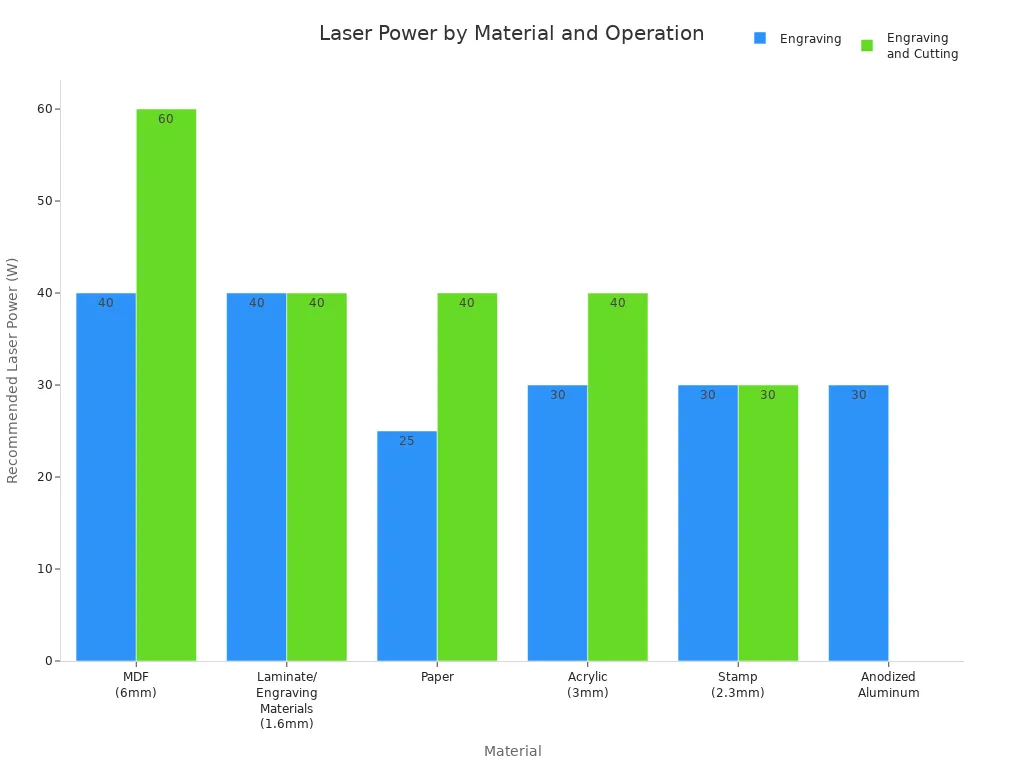
Here is a table showing recommended laser power for different materials and tasks:
|
Material |
Recommended Laser Power (Watts) |
Engraving |
Engraving and Cutting |
|---|---|---|---|
|
MDF (6mm) |
40 |
40 |
60 |
|
Laminate/Engraving Materials (1.6 mm) |
40 |
40 |
40 |
|
Paper |
25 |
25 |
40 |
|
Acrylic (3mm) |
30 |
30 |
40 |
|
Stamp (2.3 mm) |
30 |
30 |
30 |
|
Anodized Aluminum |
30 |
30 |
- |
You can see that cutting thicker or denser materials requires more power. For example, cutting acrylic often follows the rule of 10 watts per millimeter of thickness. Some plastics may need up to 200 or 400 watts for a clean cut, even if the sheet is not very thick.
Tip: Always match your laser’s power to the material and task. Using too little power can result in incomplete cuts, while too much power may damage the material.
Speed and Precision
Speed and precision set engravers and cutters apart. Laser engravers move quickly because they only need to vaporize the top layer. Laser cutters move more slowly to ensure the beam penetrates the entire material.
|
Metric |
Laser Engraver |
Laser Cutter |
|---|---|---|
|
Power (W) |
10% to 40% of max power |
60% to 100% of max power |
|
Speed (mm/s) |
300 mm/s to 600 mm/s |
5 mm/s to 30 mm/s |
|
Goal |
Vaporize top layer |
Full material penetration |
You can achieve fine details with an engraver at high speeds. When you cut, you need to slow down for accuracy and safety. Lower speeds help the laser maintain a clean edge and prevent burning or melting.
Note: If you want crisp, detailed artwork, choose an engraver. If you need to separate pieces with clean edges, a cutter’s slower speed ensures quality.
Optics and Focus
Optics and focus play a crucial role in laser performance. You adjust the focus to control how the laser energy interacts with the material. The right focus position determines energy density and penetration, which affects the quality of your engraving or cut.
-
Focus position changes the size and intensity of the laser spot.
-
Focusing above the surface enlarges the spot, which works well for thin sheets.
-
Focusing on the surface gives the highest energy density, ideal for thin materials.
-
Focusing inside thick materials spreads energy evenly, improving cut stability and edge quality.
The process of focusing involves manipulating the beam to concentrate energy into a smaller area. High-end systems use adaptive optics to maintain optimal focus and correct distortions in real time.
Tip: Always check your focus before starting. Proper focus ensures sharp engravings and clean cuts, while poor focus can cause defects or incomplete results.
By understanding these technical differences, you can select the right machine and settings for your project. This knowledge helps you achieve professional results, whether you engrave fine details or cut complex shapes.
Common Uses
Laser engravers and cutters serve many roles in both personal and commercial settings. You can unlock new possibilities for creativity, efficiency, and precision by understanding their most common applications.
Engraver Applications
Personalization
You can use laser engravers to personalize a wide range of items. Custom gifts, home decorations, and advertising items like plaques and awards become unique with engraved names, messages, or designs. Many people choose laser engraving for professional signs and branded products. This technology lets you add a personal touch to everyday objects, making them memorable and meaningful.
-
Custom gifts
-
Home decorations
-
Advertising items (plaques, awards)
-
Professional signs
Art
Artists and designers rely on laser engravers to create intricate patterns and detailed artwork. You can engrave wood, acrylic, glass, and metal to produce pieces that stand out. The precision of laser engraving allows you to experiment with textures and shading, giving your art a professional finish.
Industrial Marking
Factories and manufacturers use laser engravers for product identification and traceability. You can mark medical tools, factory branding, and equipment parts with permanent, high-precision codes or serial numbers. This process supports quality control, minimizes counterfeiting, and improves tracking.
-
CO2 laser markings ensure consistent quality, which helps avoid safety hazards.
-
The markings resist fading, even under harsh conditions.
-
Unique identifiers improve traceability and enhance quality control.
|
Feature |
Description |
|---|---|
|
Durable |
Laser marking cannot be removed or altered as it is incorporated into the part itself. |
|
Eco-Friendly |
No environmentally harmful chemicals are involved, unlike painting or chemical etching. |
|
Maintains Integrity |
Keeps the exact specifications and shape of the part while providing indelible marks. |
Industrial laser marking machines produce permanent, high-precision marks on various materials. You gain a consistent method for applying traceability information and product details, which is essential for inventory management and quality control.
Cutter Applications
Prototyping
You can use laser cutters to create prototypes quickly and accurately. Rapid prototyping in aerospace, medical devices, and heavy equipment benefits from tight tolerances and clean cuts. Laser cutters also support 3D printing and CNC machining, making them valuable tools for engineers and designers.
|
Application Area |
Description |
|---|---|
|
Medical devices |
Produces components with clean, accurate lines for surgical instruments and internal devices. |
|
Heavy equipment |
Provides tight tolerances and clean cuts for construction and warehousing equipment. |
|
Metal fabrication |
Cuts various metals and engraves detailed markings for identification. |
|
Rapid prototyping |
Enables quick production of high-quality prototypes, especially in aerospace. |
|
Customization |
Allows for efficient creation of custom pieces with engravings and made-to-order cutouts. |
|
Fabric cutting |
Excellent for intricate designs in apparel, particularly in high fashion and activewear. |
-
3D printing: Accessible and scalable for various project sizes.
-
CNC machining: Includes laser cutters and other computer-operated processes, enhancing prototyping capabilities.
Signage
Laser cutting technology excels in producing signage and displays. You achieve clean, smooth edges and flawless surfaces without extra post-processing. The ability to handle intricate cuts and engravings makes laser cutters ideal for creative and professional signage.
One of the most notable advantages of laser cutting technology is its exceptional precision. The ability to focus the laser beam into a very small point ensures extremely accurate cuts, resulting in clean, smooth edges that rarely require additional finishing.
|
Benefit |
Description |
|---|---|
|
Superior quality |
Achieve clean, smooth edges and flawless surfaces without the need for extra post-processing. |
|
Advanced design |
Easily handle intricate cuts and engravings for unique and creative signage and display solutions. |
|
Consistent precision |
Ensure reliable and repeatable quality, whether producing single pieces or large runs. |
|
Seamless integration |
Unify design, preparation, and production workflows in one intuitive platform. |
Materials commonly used for signage include:
-
Acrylic
-
Wood
-
Plywood
-
MDF
-
Plastic films
Laser cutting technology offers speed and efficiency that surpasses traditional methods. You minimize material waste and enhance yield because the process prevents mechanical deformation and reduces setup times.
Manufacturing
Manufacturers use laser cutters for mass production and custom fabrication. You can cut metals, plastics, and fabrics with high accuracy. The technology supports both large-scale manufacturing and small batch production, making it a flexible solution for many industries.
Dual-Function Machines
Can One Machine Do Both?
You may wonder if a single laser machine can handle both engraving and cutting tasks. Many modern CO₂ laser systems offer hybrid capabilities. These machines allow you to engrave detailed designs and cut shapes from the same device. You control the function through software, which lets you switch between engraving and cutting with a few clicks. This versatility makes hybrid machines popular in workshops and classrooms.
-
Hybrid CO₂ laser machines perform both engraving and cutting.
-
You can switch functions using software controls.
-
One machine handles projects that require both tasks.
Laser cutters often have enough power to engrave as well. You adjust the settings to lower the power and increase the speed for engraving. When you need to cut, you raise the power and slow down the speed. This flexibility means you do not need separate machines for different jobs. You save space and reduce costs by investing in a dual-function system.
-
Laser cutters double as engravers with proper adjustments.
-
You change power and speed settings to move between tasks.
-
Dual-function machines suit users who want to maximize efficiency.
Here is a table showing how a hybrid machine compares to single-function devices:
|
Feature |
Hybrid CO₂ Laser Machine |
Dedicated Engraver |
Dedicated Cutter |
|---|---|---|---|
|
Functionality |
Engraving & Cutting |
Engraving only |
Cutting only |
|
Software Control |
Yes |
Yes |
Yes |
|
Power Range |
Adjustable |
Lower |
Higher |
|
Space Efficiency |
High |
Moderate |
Moderate |
|
Cost Efficiency |
High |
Lower |
Lower |
Tip: If you want to work on projects that involve both engraving and cutting, consider a hybrid machine. You gain flexibility and save on equipment costs.
Settings and Limitations
You control the performance of a dual-function laser machine through software settings. You select the mode, adjust the power, and set the speed based on your material and desired outcome. For engraving, you use lower power and higher speed. For cutting, you increase the power and slow down the speed. The software interface usually provides presets for common materials, making setup easier.
-
Power settings determine whether you engrave or cut.
-
Speed settings affect the quality and depth of the result.
-
Presets help you choose the right configuration quickly.
Despite their versatility, dual-function machines have some limitations. You may find that hybrid systems do not match the precision of dedicated engravers for very fine details. Cutting thick or highly reflective materials may require specialized equipment. You should check the specifications of your machine before starting complex projects.
|
Limitation |
Impact on Performance |
|---|---|
|
Maximum Material Thickness |
May be lower than dedicated cutters |
|
Engraving Detail |
Sometimes less precise than single-use engravers |
|
Material Compatibility |
Not all materials suit both functions |
|
Maintenance Needs |
Hybrid systems may need more frequent calibration |
Note: Always test your settings on a sample piece before starting your main project. You avoid mistakes and ensure the best results.
Dual-function machines offer a practical solution for users who need both engraving and cutting capabilities. You benefit from software controls, adjustable settings, and efficient use of space. By understanding the limitations, you can choose the right machine and settings for your needs.
Cost Factors
Many factors influence the price of laser engravers and cutters. You should look at these key points when planning your budget:
-
Newer models with advanced features usually cost more.
-
Machines built with higher-quality materials and parts have higher prices.
-
Increased demand in industries can drive up costs.
-
Local market conditions and economic trends affect pricing.
-
The initial investment in a machine makes up a large part of your total cost.
-
The time needed for each job and the complexity of your designs can change the final price.
-
The type and thickness of materials you use will impact costs.
-
Larger order quantities may lower the price per piece.
-
Shipping and distribution fees add to your overall expenses.
|
Cost Factor |
Impact on Price |
|---|---|
|
Technology Level |
Higher tech = Higher price |
|
Material Quality |
Better parts = More expensive |
|
Market Demand |
High demand = Price increase |
|
Region/Economy |
Local trends = Price changes |
|
Job Complexity |
More detail = Higher cost |
|
Material Type/Thickness |
Harder to cut = More expensive |
|
Order Quantity |
Bulk orders = Lower unit cost |
|
Shipping/Distribution |
Adds to total cost |
Tip: You can manage your costs by matching your machine choice to your main materials and project needs. Start with a clear budget and consider both the initial investment and ongoing expenses.
Choosing the Right Machine
Key Questions
Before you invest in a laser engraver or cutter, you should ask yourself several important questions. These will help you narrow down your options and avoid costly mistakes:
-
What do you want to achieve with your new laser? Are you starting a business or expanding an existing one?
-
What is the size of the work area you need for your projects?
-
What are the laser power requirements for your intended applications?
-
What ongoing costs, such as maintenance and energy use, can you expect?
-
What kind of manufacturer support is available if you need help?
-
How easy is the machine to operate and maintain?
-
What are your future scalability needs if your business grows?
Tip: Write down your answers to these questions. This will help you compare machines and make a more informed decision.
Matching Features to Needs
You should match machine features to your specific needs and project requirements. Start by identifying your main goals. If you plan to engrave detailed artwork, focus on machines with high precision and speed. If you need to cut thick materials, look for higher power and a larger work area.
User personas and user stories can help you clarify your needs. For example, if you are a small business owner making custom gifts, you may value ease of use and low maintenance. If you work in a workshop producing prototypes, you may need advanced automation and scalability.
You can also gather insights by talking to other users, conducting surveys, or observing how similar machines perform in real-world settings. Usage data can reveal patterns that help you choose features that matter most for your workflow.
|
User Type |
Priority Features |
Typical Projects |
|---|---|---|
|
Hobbyist |
Ease of use, safety, low cost |
Crafts, home décor |
|
Small Business |
Versatility, reliability |
Custom gifts, signage |
|
Industrial |
High power, automation, support |
Prototyping, production |
Tips for Buyers
When you buy a laser machine, you can avoid common mistakes by following these tips:
-
Consider Total Cost of Ownership: Look beyond the purchase price. Factor in energy use, maintenance, and expected uptime.
-
Match Equipment to Production Needs: Make sure the machine suits the materials and thicknesses you plan to work with.
-
Look for Smart Automation Features: Choose machines that integrate with software and loading systems to boost efficiency.
-
Evaluate Supplier Support: Ask about local service, spare parts, and training programs.
-
Plan for Future Needs: Select equipment that can be upgraded or adapted as your needs change.
Note: Careful planning and research will help you select a machine that fits your current needs and supports your growth.
By asking the right questions, matching features to your needs, and following expert tips, you can confidently choose the best laser engraver or cutter for your projects and budget.
You now understand the key differences between laser engravers and cutters. The table below highlights what sets them apart:
|
Feature |
Laser Engraving |
Laser Cutting |
|---|---|---|
|
Primary Goal |
Permanent surface mark |
Slice through material |
|
Process Type |
Raster (back-and-forth motion) |
Vector (continuous path) |
|
Power |
Lower, faster |
Higher, slower |
|
Outcome |
Decorated object |
Separate new pieces |
Choose your machine based on your project goals and materials. Use this guide to make informed decisions. For expert advice, reach out to a specialist or explore more resources.
FAQ
What is the main difference between a laser engraver and a laser cutter?
You use a laser engraver to mark or etch the surface of a material. A laser cutter slices completely through the material. The main difference lies in the depth and purpose of the laser’s action.
Can one machine perform both engraving and cutting?
Many modern machines allow you to switch between engraving and cutting by adjusting power and speed settings. You can complete both tasks with one device, but always check the machine’s specifications for material compatibility and maximum thickness.
Which materials can you engrave but not cut?
You can engrave metals like stainless steel or anodized aluminum with a fiber laser, but you cannot cut thick metals with most entry-level machines. Glass and stone also engrave well but usually cannot be cut with standard laser systems.
How do you choose the right laser power for your project?
Select laser power based on material type and thickness. For engraving, lower power (10–40W) works well. For cutting, use higher power (above 60W). Always test settings on a sample piece before starting your main project.
Is laser engraving or cutting safe for beginners?
Laser machines are safe if you follow safety guidelines. Always wear protective eyewear, use proper ventilation, and never leave the machine unattended. Read the user manual and start with simple projects to build confidence.
How do you maintain a laser engraver or cutter?
Clean the lens and mirrors regularly. Check for debris in the work area. Replace filters as needed. Keep the machine’s moving parts lubricated. Regular maintenance ensures consistent performance and extends the machine’s lifespan.
What are common mistakes to avoid when using laser machines?
-
Using incorrect power or speed settings
-
Failing to focus the laser properly
-
Ignoring material compatibility
-
Skipping safety checks
Tip: Always test on scrap material and review your settings before each job.
Can you use a laser engraver or cutter on any material?
No. Some materials, like PVC or certain plastics, release toxic fumes when lasered. Always check the manufacturer’s guidelines and material safety data sheets before starting a new project.
